Showing posts with label english language arts. Show all posts

Getting into Character Through Mock Tweets

Reading is more than just understanding the words on a page and no one knows this more than English teachers. Two 9th grade teachers at my school, Katie Ann Prescott and Lori McDonald, wanted some new ideas to get their students critically thinking while reading Frankenstein. I shared my Creative Expressions Ideas resource with them and they chose to have students tweet as they were one of the characters in the novel. Those who understand the critical thinking that needs to take place for readers to get into the mind of a character will see how this simple, yet complex task really shows what students understand. 

Katie Ann and Lori chose to go the non-digital route for this activity, but I will give digital options below. The students received index cards and post-its. The assignment was to, on the index card, create a tweet from the mind of one of the characters. The tweet needed to reveal the main idea of the chapter from the characters point of view and include a hashtag to summarize the chapter. One of the teachers had each student individually create a tweet, while the other teacher allowed them to work in partners. The tweets were displayed in the hall under the appropriate chapter and character, which allowed the class to take a gallery walk to read the tweets. Each student then used the post-it notes to respond to the tweets. 


Both Katie Ann and Lori were pleasantly surprised and amazed at the work that they students produced. This was a wonderful formative assessment piece that the teachers can use to see if the students truly understood how to analyze the character of a novel while addressing the main idea in a summary format. 

Here are a few digital options you could use to replicate this activity (list is not exhaustive):
  • Tweet page - this will not allow for quote tweets
  • Tabletop Tweet - each student is responsible for the Tweet It, Capture It, and Hashtag It boxes and then is assigned a partner to switch with for the Retweet It portion. 
  • Padlet (tutorials)- although you are limited to 3 walls on the free account, you could use the shelf template to represent the chapters/characters. Each of your classes could use the same Padlet wall. Enable the comment feature so that students can then use this to respond to the tweets. 
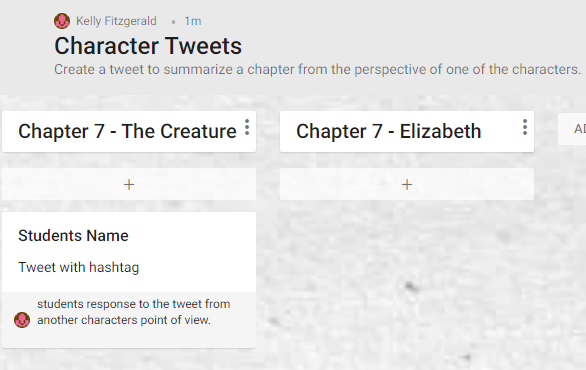
  • LinoIt (visual explanation) - students must create an account to use this tool. It does have Google login capabilities. Like Padlet, this is a board that allows users to create sticky notes and place in various locations around a board. 


Mash-up: Online Article + Google Drawing = Blackout Poetry

If you haven't heard of Blackout Poetry, please check out the Austin Kleon website and Newspaper Blackout website. The concept is simple, but loads of fun and I felt empowered after my poetry creation. 

You can preselect the newspaper article or allow students to find an article of their choosing. While I am all about allowing students choice, I would be intrigued to see all of the poems that would come from one piece of published writing. 

Tools you will need:

  • Computer with internet access
  • Newspaper Website (any will do)
  • Screenshot tool (on the computer or Chrome extension, such as Awesome Screenshot)
  • Google Drawing


I wouldn't by any means consider myself a poet, but within 10 minutes I was able to take a screenshot of an article - the first one I came across - put it into Google, and create a poem. It might not be the best, but I am proud of my poem. 


Here is a video that will show you how students can perform this same activity. 


What a fun way to get students engaged in writing and creating masterpieces from someone else's published thoughts. 


18 EdTech Integration Ideas for the Language Arts Classroom

During the September 15th #gafechat Twitter chat, I posed content specific questions to drive conversation and sharing of ideas around 'Creating Digital Awareness'. If you missed the chat, you can find the full archives here.

Here is the Language Arts question that I posed:


Here are some of the ideas that the participants shared. 


The students could...
  1. do an exquisite corpse - have each student write for two minutes and then have students switch and another student continue the story. (@mbswoods)
  2. write using the new Voice feature in Google documents (@alicebarr)
  3. write a collaborative story using a Google Document. Each student can take turns writing a sentence. (@LISDTechie)
  4. summarize in "tweet" style (140 characters or less) (@curryhj2000)
  5. Tweet a writer on Twitter to ask questions about a book (@curryhj2000)
  6. blog and share their thoughts with the class or world. (@TeachingFactor)
  7. create a writing E-portfolio on Google Slides and add images to support. (@TeachingFactor)
  8. write stories together using Story Wars (@ShakeUpLearning)
  9. write a story on a Google document and use the Research Feature to include images to support. (@LISDTechie)
  10. post a question in Google Classroom and have them respond (@MLunoff)
  11. create an online flipbook using FlipSmackEDU (@nsattler) 
  12. record their reflection/thoughts using Vocaroo, save in Google Drive and share with others. (@LISDTechie)
  13. compare and contrast two images provided by the teacher via a Google Form inserted image and paragraph text box. (@tntechgal)
  14. create a Choose Your Own Adventure story using Google Slides or Google Forms (@LISDTechie)
  15. create editorial style blog posts about current events. Have other students comment on posts. (@ospikes) Google Document with commenting rights is great for this. 
  16. compose a quick conversation between two characters (historical, mathematical, fictional, etc.) using Story Builder. (@LISDTechie) 
  17. draft, write, edit, revise, and then record a podcast using SoundTrap (@AlexaSchlechter) 
  18. participate in quadblogging to infuse an authentic audience to engage students (@kilgoretech)
Additional Resources Shared:


Check out these posts for other edtech integration ideas: