I started my journey of blogging about my favorite Chrome extensions back in August 2014. Each week for the past nine months I have blogged about four extensions that I felt teachers and students should know about. While I have enjoyed my journey of discovering and sharing all these wonderful resources, I feel it is time for this journey to come to an end. While I will continue to blog about Chrome extensions periodically, this will be my last official 'Favorite Chrome Extensions of the Week' post. With that being said, I hope you have found these posts beneficial. People say that you always keep the best for last and I truly feel that this post might be the best. The first three extensions showcased below can be game-changers in the classroom. Enjoy!!! #1: Google Tone Type: Accessibility Summary: This is a new Chrome extension that will transform the way that teachers share online resources with students. The extension is similar to the app Chirp in that it allows someone to transmit a URL to other people via sound. All parties must have the extension downloaded and enabled for it to work. When you want to share a URL, simply click the extension icon and every computer within earshot will receive a popup with a link to the URL.
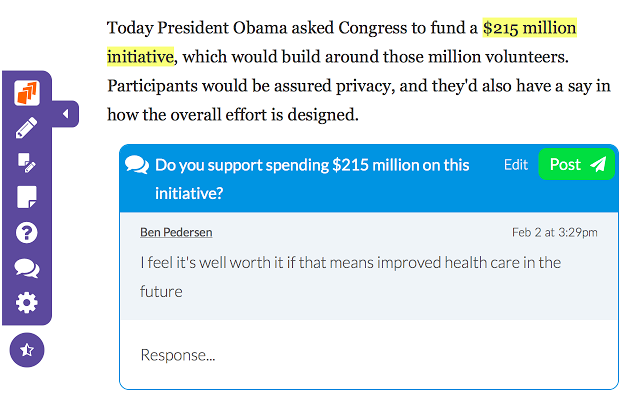
#2: DocentEDU Type: Social & Communication Summary: This extension allows you to easily highlight text, add comments, embed videos, and add discussion to an online website. Assign the websites with the added resources to students. This extension is great for adding to already existing information. Teachers can create all inclusive lessons with this extension.
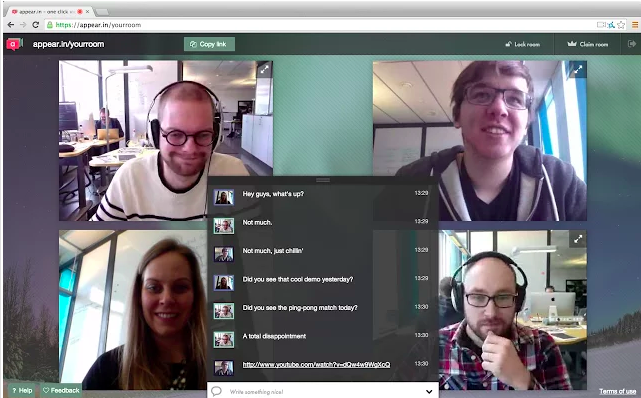
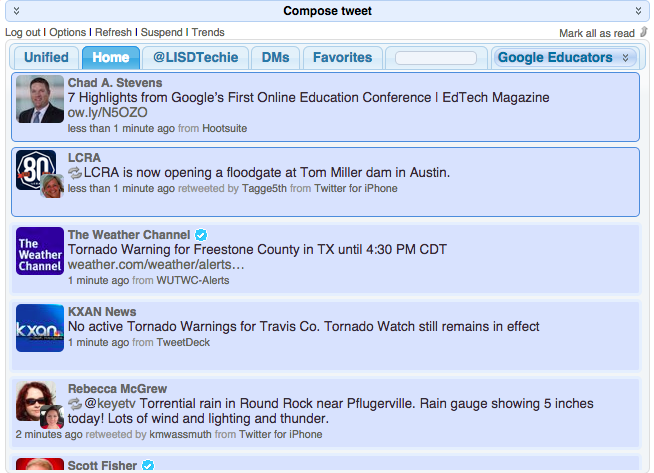
#3: Appear.in Type: Social & Communication Summary: I just recently learned about this website/extension and I see so many possibilities. Appear.in lets you start a video conversation with anyone right in the browser, without the need to download and install anything, or register an account. Invite up to 8 people to a video conversation just by sending them a link. You can claim a 'room,' which means that you have that URL to use whenever you need. You can share your screen with the viewers which is great for demonstrations or tutorials. #4: Silver Bird Type: Social & Communication Summary: This extension allows you to interact with your Twitter feed from any open tab/window. You can check your home feed, your mentions, direct messages, favorites, particular feeds from your lists, and compose a tweet. Great extension for anyone who uses Twitter.
It has been a great journey showcasing my favorite Chrome extensions. Look for other recommendations in the future.
I will be honest, I am relatively new to Google+. My district has just recently decided to open it up for staff. I felt the need to create resources to help them through the transition. This week I created a Google+ Overview Cheat Sheet, Starting a Google Hangout Cheat Sheet, and Participating in a Google Hangout Video Chat Cheat Sheet. I have gotten a lot of great feedback from those cheat sheets. I love creating resources that others find useful...after all why would you create something that people won't use. Now that the basics have been created I feel like I need to address the purpose of using Google+ and Hangouts. First off, it is a great tool to use professionally. We teach in a time where teachers should no longer have their "door" closed. I mean that metaphorically, of course. If we expect to make a great impact in education, then we need to come together and collaborate worldwide. Google+ opens the door for educators to come together to build a Professional Learning Network (PLN). Here are just a couple ways to build your Google+ PLN:
Find educators you trust and admire and add them to your circles.
Join a community that specializes in your interests and/or subject(s) you teach.
Ask questions, request help and find resources through your circles and communities.
Share your resources and ideas.
Lead/Attend a professional development via a Google Hangout Video Chat
I know Google+ is not the only way to build a PLN. I am also active on Twitter and love my Twitter PLN, but why limit myself to only one source. Secondly, Google+ is a great tool to use with students. I am going to be working on a resource in the near future that will highlight various ways, but until then let me highlight just a few:
Participate in a Mystery Hangout - this will introduce students to other students around the world, as well as help them develop their questioning skills.
Bring experts into the classroom via Hangouts - invite authors, engineers, community members, etc. into the classroom via a Hangout
Have students create study groups
Host tutorials via Google Hangouts Live on Air - have students use the chat feature to post their questions/needs
Here is a link to a blog that was written on Google Hangouts. They shared several ideas, as well as featured one of the resources I created.
If you are on Google+ please add me and become part of my PLN.