Showing posts with label Twitter. Show all posts

Recommended Educational Twitter Chats

Twitter chats are topic centered conversations that take place on Twitter through a specific hashtag. There are generally two different types of chats. The first is referred to as a 'slow' chat, which means that a question is posed every day or week and people answer the question when they have time. The second and most popular kind is a 'live' chat, which takes place on a certain day and time and people engage in a live conversation. 

If you have never participated in a Twitter chat, I suggest you start slow as not to overwhelm yourself. Some chats move so fast that your head can start to spin. By slow, I mean don't feel you have to answer every question. Pick and choose or spend the entire time 'lurking' and not participating. It is okay to lurk during a chat until you get comfortable with the format and flow. 


https://sites.google.com/site/gafechat/tips

My list of recommended live Twitter chats:

#tosachat - Chat for Teachers on Special Assignment (TOSA) 
Description: The chat covers a wide range of topics, such as STEAM, Coding, Having Hard Conversations, Tool & Templates, and PBL. While the chat focuses on discussions for educators who support other educators, anyone can benefit from the conversation.
Websitehttp://www.tosachat.org/ (check out chat transcripts on homepage)
Date: Every Monday
Time: 10:00-11:00 pm (CST)
Founders/Moderators: Ben Cogswell, Karly Moura, Joe Young, Kelly Martin
 
#educoach - Chat for Instructional Coaches
Description: The chat covers a wide range of topics to help Instructional Coaches with their job, such as teacher isolation, helping teachers develop growth mindset, leading professional development, and crucial conversations. 
Websitehttps://educoachchat.wikispaces.com/ (check out chat transcripts on Archives page)
Date: Every Wednesday
Time: 9:00-10:00 pm (CST)

#tlap - Chat for Teachers
Description: The chat is centered around Dave Burgess, Teach Like a Pirate book. The chat covers a wide range of topics teachers can use to increase student engagement.
Website: none
Date: Every Monday
Time: 8:00-9:00 pm (CST)
Founder/ModeratorDave Burgess

#gafechat - Chat for Google (Apps) for Education Educators/Districts
Description: The chat is centered around Google (Apps) for Education topics. Some times the discussion will be centered all around a particular Google tool, such as Sites. Other times the discussion will center around using Google during a specific instructional strategy/best practice, such as Genius Hour. 
Websitehttps://sites.google.com/site/gafechat/home (check out chat transcripts on Chat Archives page)
Date: 1st and 3rd Tuesday of the month
Time: 8:00-9:00 pm (CST)
Founder/Moderator: Kelly Fitzgerald (me)


There are so many Twitter chats, I couldn't possible mention them all. If you are interested in learning more about the various Twitter chats offered throughout the week, please visit the following resources:

Twitter is my favorite form of professional development, with edcamps being second. The majority of what I learn professionally comes from following certain hashtags and participating in Twitter chats. I encourage you to check out one of the chats mentioned above. I strongly believe that you will not be disappointed. 


Using Collections in TweetDeck to Save Tweets

TweetDeck is the perfect tool for following along during a Twitter chat because it allows you to build columns to keep track of the chat feed, notifications, mentions, home feed, etc.

If you have ever participated in a twitter chat then you know how hard it can be to check out the resources shared and keep up with the chat. There are many different methods for 'saving' the resources shared. I personally use the collections feature in TweetDeck to gather those resources to review at a later time.


Here is how to add a collection and start saving those wonderful resources people are sharing. 

Step 1: Click on Add Column


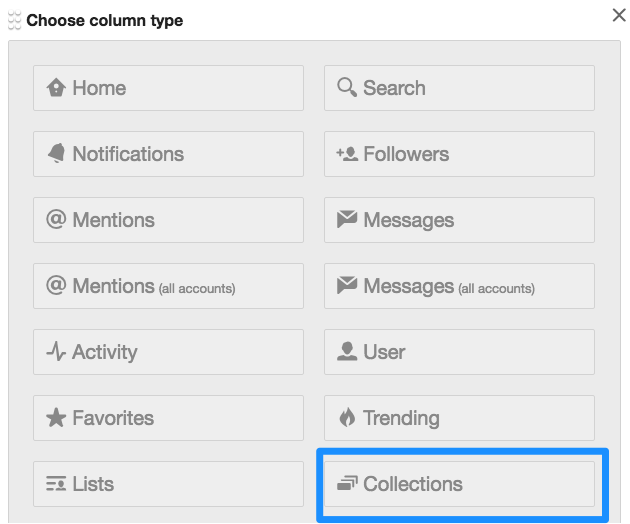
Step 2: Click on Collections


Step 3: Click on Create Collection


Step 4: Name Collection


Step 5: Check the Collection Name and Click Done


Favorite Chrome Extensions - Week of May 25th

I started my journey of blogging about my favorite Chrome extensions back in August 2014. Each week for the past nine months I have blogged about four extensions that I felt teachers and students should know about. While I have enjoyed my journey of discovering and sharing all these wonderful resources, I feel it is time for this journey to come to an end. While I will continue to blog about Chrome extensions periodically, this will be my last official 'Favorite Chrome Extensions of the Week' post. 

With that being said, I hope you have found these posts beneficial. People say that you always keep the best for last and I truly feel that this post might be the best. The first three extensions showcased below can be game-changers in the classroom. Enjoy!!!

#1: Google Tone
Type: Accessibility
Summary: This is a new Chrome extension that will transform the way that teachers share online resources with students. The extension is similar to the app Chirp in that it allows someone to transmit a URL to other people via sound. All parties must have the extension downloaded and enabled for it to work. When you want to share a URL, simply click the extension icon and every computer within earshot will receive a popup with a link to the URL. 

#2: DocentEDU
Type: Social & Communication
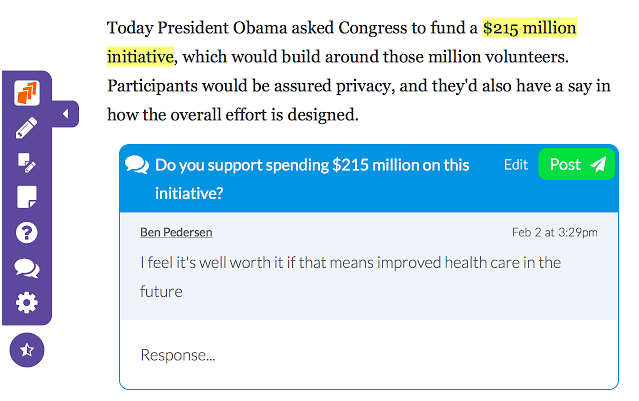
Summary: This extension allows you to easily highlight text, add comments, embed videos, and add discussion to an online website. Assign the websites with the added resources to students. This extension is great for adding to already existing information. Teachers can create all inclusive lessons with this extension. 


#3: Appear.in
Type: Social & Communication
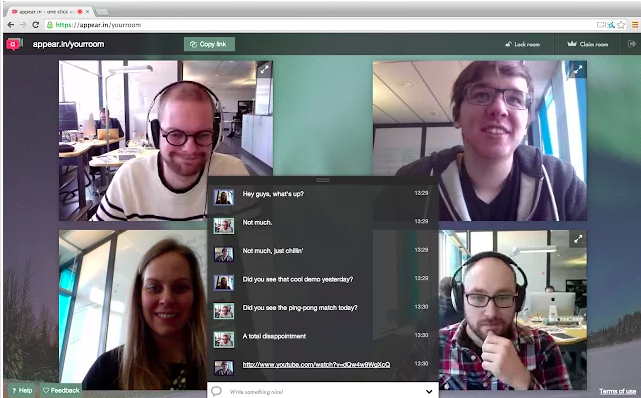
Summary: I just recently learned about this website/extension and I see so many possibilities. Appear.in lets you start a video conversation with anyone right in the browser, without the need to download and install anything, or register an account. Invite up to 8 people to a video conversation just by sending them a link. You can claim a 'room,' which means that you have that URL to use whenever you need. You can share your screen with the viewers which is great for demonstrations or tutorials.


#4: Silver Bird
Type: Social & Communication
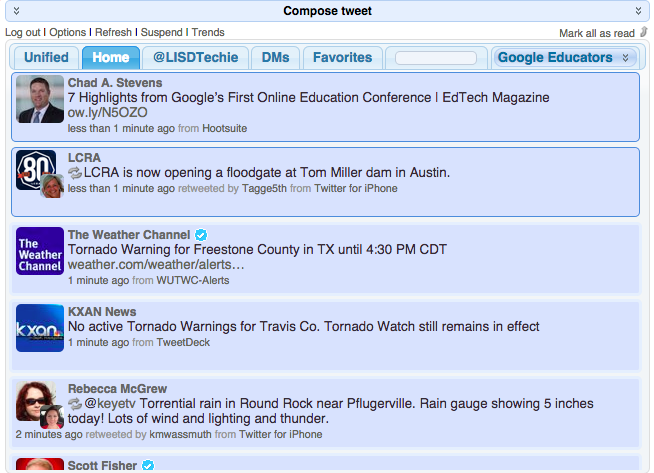
Summary: This extension allows you to interact with your Twitter feed from any open tab/window. You can check your home feed, your mentions, direct messages, favorites, particular feeds from your lists, and compose a tweet. Great extension for anyone who uses Twitter. 


It has been a great journey showcasing my favorite Chrome extensions. Look for other recommendations in the future. 


Using Twitter to Become a Strong Educator

Mentioning Twitter in a room full of educators always gets a diverse response. You have those who think Twitter is just another social networking site to keep up with all the Hollywood gossip and they would never fathom having an account. While the opposite spectrum has come to realize how powerful Twitter can be as an educational resource. I strongly believe that once educators can see the value of using Twitter as a Professional Learning Network they will become a fan themselves. But you can't become a fan unless you jump in and see the power yourself. 

Perhaps you are already a Twitter fan! Use these resources to help get other educators on the Twitter train. The more we can get people sharing their vast knowledge and great resources the stronger we become as educators.

Understanding Twitter Here is a Twitter for Educators resource I created to help educators become familiar with Twitter. The best way to see the power of Twitter is to jump in and see what it is all about. 

Keeping Up With the Fast Paced Twitter Stream
I am not on Twitter 24/7. In fact there are days that I go where I don't have time to jump onto Twitter at all. I have come to realize that is okay even though I know I am missing out on some great sharing. When I am on Twitter I use Tweetdeck to keep up with all the great posts.  For those who are not familiar with Tweetdeck it allows you to create columns so you can see all the activity from those you follow, hashtags that interest you, lists you have created, and more. Here is Tweetdeck in a Nutshell to help you better understand how to use this amazing web application.


Finding People to Follow
The hardest part of using Twitter is figuring out who to follow. The best advice I can give you is find some teachers you know and admire on Twitter and see who they follow. Once you start following someone if you don't find their posts valuable, then you can easily unfollow them. If you don't know where to start check out Jerry Blumengarten's (@Cybrayman1) PLN Twitter list


Using Twitter in Education
Twitter is very popular right now, so why not use the tool in the classroom. Here are some ideas on using Twitter to engage students and parents. 


Additional Resources from Great Educators
Now I know I am not the expert on Twitter. There are so many great resources out there all you have to do is search. Here are some that I have gathered in the past that I want to share. I listed the name of the website page/blog entry and the person who wrote it. If I knew the author's Twitter handle, then I hyperlinked the person's name to their account so you can start following them. 


10 Steps for Educators New to Twitter by Justin Tarte